


A website redesign can improve branding, usability, mobile experience, page speed, and conversions. It can also damage years of organic search progress if important SEO signals are changed or removed during the process.
Many redesign-related ranking losses do not happen because the new design is unattractive. They happen because the launch changes URLs, removes useful content, weakens internal links, introduces indexation problems, or breaks technical elements that search engines depend on.
The most damaging website redesign mistakes are usually preventable.
Businesses can reduce risk by documenting the current website, protecting high-value pages, testing the staging environment, and reviewing the new site from an SEO perspective before it goes live.
This guide explains the most common website redesign mistakes destroying SEO performance, why they matter, and what should be done instead.
Why Website Redesigns Create SEO Risk
Search engines do not evaluate a website only by how modern it looks.
They use signals such as:
- page URLs
- content relevance
- title tags
- headings
- internal links
- backlinks
- canonical tags
- crawlability
- indexation
- site architecture
- mobile usability
- page speed
- structured data
A redesign can change several of these signals at the same time.
A visual update that preserves URLs, content, metadata, and internal links may create limited SEO disruption. A redesign combined with a CMS change, URL restructuring, content rewrite, or hosting migration carries much greater risk.
Redesign scope | General SEO risk | Main concerns |
|---|---|---|
Visual styling changes only | Lower | Speed, mobile layout, hidden content |
New theme or page builder | Moderate | Headings, metadata, schema, performance |
Navigation and structure changes | Moderate to high | Internal links, crawl depth, orphan pages |
Content and URL changes | High | Redirects, lost relevance, backlinks |
CMS or platform migration | High | Templates, canonicals, sitemaps, redirects |
Domain, CMS, and redesign together | Very high | Large-scale signal transfer and indexation |
The more elements that change simultaneously, the more important a pre-launch website redesign SEO audit becomes.
Mistake 1: Changing URLs Without a Redirect Plan
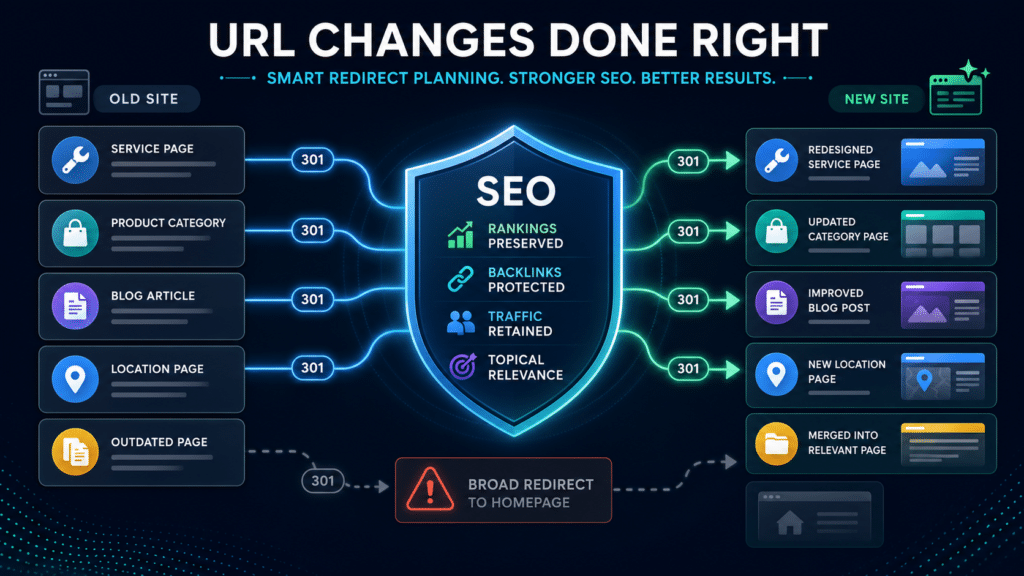
Changing URLs without implementing suitable redirects is one of the most serious redesign mistakes.
An old URL may already have:
- Google rankings
- organic traffic
- backlinks
- internal links
- user bookmarks
- referral traffic
- historical authority
If that URL disappears after redesign, users and search engines may reach a 404 page.
A 301 redirect should normally connect the old URL to the closest relevant new page.
For example:
Old URL | Correct destination |
|---|---|
Old service page | New version of the same service |
Old product category | Equivalent new category |
Updated blog article | New URL for that article |
Merged service pages | New consolidated service page |
Discontinued product | Relevant replacement or category |
Page with no useful replacement | 404 or 410 may be appropriate |
Redirecting every changed URL to the homepage is not a reliable solution. It weakens relevance and may be treated as a soft 404 when the destination does not satisfy the original page intent.
Better approach
Create a URL mapping document before launch. Include each old URL, its planned destination, redirect type, traffic value, backlink value, and testing status.
Then crawl the old URLs after launch to verify that all redirects work correctly.
Mistake 2: Removing Pages That Already Generate Traffic
A page may look outdated while still generating rankings, backlinks, leads, or sales.
Removing it because it does not fit the new design can create immediate traffic loss.
Before deleting or merging any page, review:
- organic traffic
- ranking keywords
- backlinks
- conversions
- internal links
- referral traffic
- Search Console impressions
- business relevance
Pages with measurable value should not disappear without a clear replacement strategy.
Better approach
Preserve the page, improve it, merge it carefully, or redirect it to a highly relevant alternative.
The design team should not decide page removal based only on appearance or navigation preferences.
Mistake 3: Replacing Useful Content With Thin Design-Led Pages
Minimalist layouts often use large images, short slogans, and limited supporting text.
This can improve visual presentation, but it may reduce the page’s ability to answer search intent.
A service page may lose:
- detailed service information
- FAQs
- process explanations
- location details
- comparison sections
- supporting subtopics
- case studies
- relevant terminology
- contextual internal links
If the old page ranked because it provided useful depth, replacing it with a short promotional page can weaken relevance.
Better approach
Preserve or improve the information that supports rankings.
Content can be reorganized into:
- accordions
- tabs
- visual sections
- comparison tables
- FAQ blocks
- supporting sections below the main conversion area
Good design and useful SEO content do not need to conflict.
Mistake 4: Losing Optimized Title Tags and Headings
A new theme, CMS, or template may overwrite existing metadata.
Common problems include:
- all pages using the same title format
- service pages receiving generic titles
- H1 headings replaced by slogans
- multiple H1 tags appearing
- title tags becoming too long
- meta descriptions disappearing
- headings no longer matching page intent
For example, an existing title such as:
Emergency Plumbing Services in Denver | Company Name
may become:
Services | Company Name
The redesigned title is cleaner but much less specific.
Better approach
Export important metadata before redesign and review it against the staging site.
Check:
- title tags
- meta descriptions
- H1 headings
- H2 and H3 structure
- canonical tags
- social metadata where relevant
Do not automatically copy every old element, but preserve clear keyword relevance and page intent.
Mistake 5: Weakening Internal Links
Internal links help search engines find pages, understand topic relationships, and assess page importance.
A redesign may weaken internal linking when:
- navigation is simplified
- footer links are removed
- breadcrumbs disappear
- blog-to-service links are deleted
- important pages move deeper into the structure
- crawlable links are replaced by JavaScript elements
- related service sections are removed
- category hierarchies change
An important service page may still exist after redesign but receive far fewer internal links.
That can reduce its discoverability and internal authority.
Better approach
Compare internal link data before and after redesign.
Protect links to:
- main services
- high-value categories
- priority products
- important locations
- strong blog resources
- conversion pages
Important pages should remain accessible through logical HTML links.
Mistake 6: Leaving Noindex or Staging Restrictions on the Live Site
Staging websites are often blocked from search engines to prevent unfinished pages from being indexed.
Common staging protections include:
- noindex meta tags
- X-Robots-Tag headers
- robots.txt restrictions
- password protection
- CMS privacy settings
Problems occur when those settings remain active after launch.
A live site can appear normal to users while telling Google not to index its pages.
Better approach
Before launch, verify that important pages:
- return a 200 status code
- do not contain noindex directives
- are not blocked in robots.txt
- are not password-protected
- use live canonical URLs
- are included in the correct sitemap
Use Google Search Console URL Inspection after launch to validate priority pages.
Mistake 7: Pointing Canonicals to Staging or Old URLs
Canonical tags help search engines identify the preferred version of a page.
During redesign, they may accidentally point to:
- staging URLs
- the old domain
- HTTP versions
- redirected URLs
- unrelated pages
- the homepage
- duplicate parameter URLs
An incorrect canonical can cause Google to ignore the new page or select the wrong URL for indexing.
Better approach
Canonical tags should be:
- live
- indexable
- absolute
- consistent with internal links
- consistent with sitemaps
- self-referencing where appropriate
Review both the declared canonical and Google-selected canonical for important pages.
Mistake 8: Submitting an Incorrect XML Sitemap
A redesigned website should have an XML sitemap that reflects the new live structure.
Common sitemap problems include:
- old URLs remaining in the sitemap
- redirected URLs being included
- staging pages being included
- noindex pages appearing
- 404 pages appearing
- important new URLs missing
- HTTP and HTTPS versions mixed together
- duplicate URLs included
An inaccurate sitemap can make crawling and indexation harder to evaluate.
Better approach
The sitemap should contain canonical, indexable URLs that return 200 status codes.
After launch:
- Test the sitemap.
- Submit it in Google Search Console.
- Review submitted and indexed page counts.
- Investigate exclusions and errors.
Mistake 9: Breaking Structured Data
Structured data may disappear when templates are rebuilt.
Depending on the website, the old design may include:
- Organization schema
- LocalBusiness schema
- Product schema
- Article schema
- BreadcrumbList schema
- FAQPage schema
- event information
- ecommerce product data
Removing structured data may reduce search result enhancements and make page entities less clear.
Duplicate or incorrect schema can also create validation errors.
Better approach
Compare structured data across old and new templates.
Validate representative pages such as:
- homepage
- service page
- location page
- product page
- category page
- blog article
Schema should reflect visible page content and current business data.
Mistake 10: Making the New Website Slower
Redesigns often introduce heavier images, videos, animations, fonts, scripts, sliders, and page-builder components.
The result may look more modern but perform worse.
Potential consequences include:
- slower loading
- weaker mobile experience
- lower conversion rates
- delayed interaction
- unstable layouts
- inefficient crawling
The most useful comparison is not whether the staging site receives a passing score. It is whether the redesigned site performs better or worse than the current site.
Performance area | What to compare |
|---|---|
Server response | Old site versus staging and live site |
Largest Contentful Paint | Main page types on mobile and desktop |
Interaction to Next Paint | Menus, forms, filters, and buttons |
Cumulative Layout Shift | Images, banners, fonts, and ads |
Page weight | Images, video, CSS, and JavaScript growth |
Third-party scripts | Tracking, chat, reviews, and marketing tools |
There is no single speed score that guarantees rankings. However, major performance deterioration should be fixed before launch.
Mistake 11: Hiding Important Content on Mobile
A responsive redesign may remove, collapse, or hide sections on smaller screens.
This can create problems if the mobile version loses:
- service information
- internal links
- headings
- FAQs
- product details
- calls to action
- location information
Google primarily evaluates the mobile version of website content for indexing.
Better approach
Review the actual mobile output, not only the desktop editor.
Make sure important content and links remain accessible on mobile devices.
Accordions can be acceptable, but their content should still be present in the rendered page and useful to visitors.
Mistake 12: Launching Without Verifying Analytics and Conversions
A redesign can break analytics without affecting rankings.
This may make it appear that traffic or leads collapsed when measurement is the real problem.
Check:
- Google Analytics
- Google Tag Manager
- form submissions
- phone-click events
- ecommerce transactions
- thank-you pages
- CRM integrations
- call tracking
- newsletter signups
- consent settings
A large Analytics decline with stable Search Console clicks usually points to tracking problems.
Better approach
Test analytics and conversions on staging, then repeat the tests after launch.
Document key events before redesign so none are forgotten.
Mistake 13: Launching Without a Post-Launch Crawl
Manual checks rarely find every redesign problem.
A crawler can detect:
- missing pages
- broken links
- 404 errors
- redirect chains
- missing metadata
- duplicate titles
- noindex pages
- canonical problems
- unexpected URL changes
- sitemap inconsistencies
- orphan pages
Better approach
Crawl the old site before redesign and the live site immediately after launch.
Compare the results to identify meaningful changes.
A second crawl after developers implement corrections can confirm that issues were resolved.
Which Redesign Mistakes Require the Fastest Response?
Some errors are more urgent than others.
Issue | Priority | Why |
|---|---|---|
Sitewide noindex | Critical | Can remove the site from search |
Robots.txt blocks | Critical | Can prevent crawling |
Broken domain or URL redirects | Critical | Interrupts users and signal transfer |
Widespread 5xx errors | Critical | Makes pages unavailable |
Staging canonicals | High | May cause wrong URLs to be selected |
High-value pages returning 404 | High | Loses traffic and backlink destinations |
Removed ranking content | High | Weakens page relevance |
Broken analytics | High for measurement | Prevents accurate diagnosis |
Missing schema | Moderate | May reduce enhancements, usually not total visibility |
Minor metadata issues | Moderate | Should be corrected, but often not catastrophic |
Small speed regression | Moderate | Evaluate against usability and conversion impact |
Critical issues should be fixed immediately rather than waiting for the next reporting cycle.
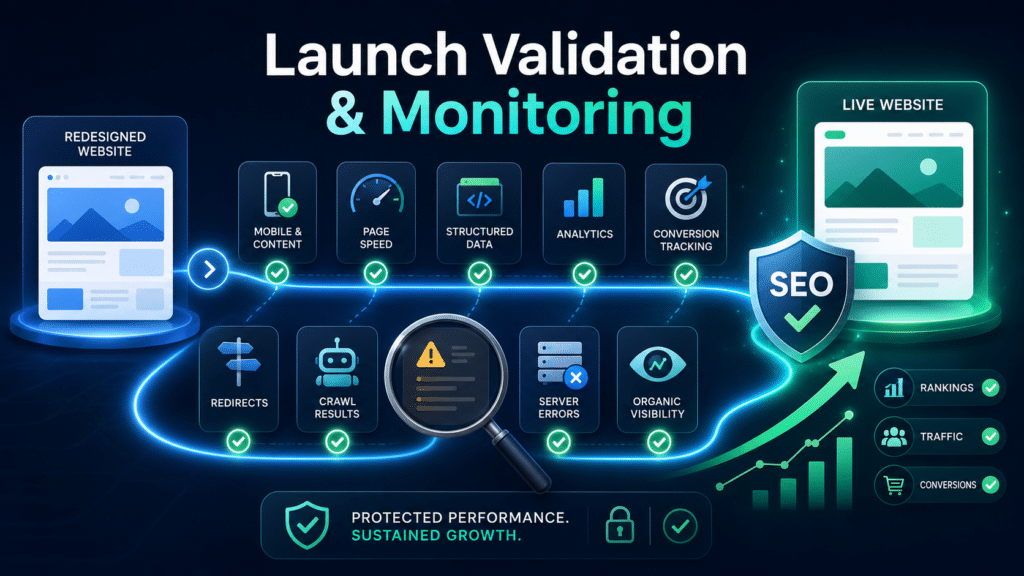
Website Redesign SEO Audit Checklist
Before launch, review:
- current URLs and proposed URLs
- high-value organic landing pages
- pages with backlinks
- redirect mapping
- content changes
- title tags and headings
- internal links
- navigation
- canonical tags
- robots directives
- noindex settings
- XML sitemaps
- structured data
- mobile content
- page speed
- analytics
- conversion tracking
After launch, review:
- redirects
- status codes
- indexability
- Search Console
- sitemap processing
- Google-selected canonicals
- ranking changes
- organic traffic
- conversions
- server errors
- crawl results
A website redesign SEO audit is most effective when it covers both staging and post-launch implementation.
Redesign Without Sacrificing Organic Visibility
A website redesign should improve how the business looks, communicates, and converts visitors. It should not erase the rankings, traffic, backlinks, and authority already built.
Most website redesign mistakes destroying SEO performance are avoidable when search considerations are included early.
The safest approach is to preserve valuable pages, limit unnecessary URL changes, retain useful content, protect internal links, and validate technical settings before launch.
When a redesign involves structural, content, platform, or URL changes, a website redesign SEO audit can identify risks in the existing website, staging environment, redirect plan, and launch implementation before they become long-term traffic losses.